Trust Levels: How Agents Earn Autonomy (Part 2)
Part 2 of the Agentic Design Systems series. The five trust levels (Observer, Advisor, Junior, Senior, Autonomous), what each one is allowed to do, and the exact criteria to promote an agent from one level to the next.
The short version
The fastest way to ruin a design system with AI is to give every agent the same authority. The fastest way to never get value from AI is to give every agent zero authority.
Both ends of that spectrum are common. Both are wrong.
An agentic design system treats AI agents the same way you would treat a new hire: they earn responsibility one level at a time, against criteria you can name out loud. There are five levels. Each one has its own scope, its own promotion criteria, and its own demotion conditions.
This guide gives you those five levels, the rules for each, and a practical promotion ladder you can apply to any agent in your stack.
The question is not “do I trust AI?” The question is “which agent, doing which task, with which scope of write access?” The answer is different for every combination.
Why this matters now
Three things make trust levels urgent in 2026:
- AI agents can now take real actions. Not just answer questions. They can rename files, edit tokens, open pull requests, and ship code. Untrusted agents with write access cause real damage.
- Most teams default to “all or nothing.” Either the agent is locked to chat (no leverage) or it has full write access (no governance). Neither is sustainable.
- Promotion criteria do not exist by default. You have to write them. If you do not, the agent’s authority creeps upward through habit, not decision.
Trust levels are the missing layer between “AI in chat” and “AI in production.”
The five trust levels at a glance
- L0
Observer
Reads, audits, reports. Cannot modify anything.
- L1
Advisor
Suggests in plain text. Cannot open PRs or edit files.
- L2
Junior
Opens small, scoped PRs. Always requires review.
- L3
Senior
Merges low-risk PRs in approved categories. Ships behind flags.
- L4
Autonomous
Runs end-to-end loops in approved domains, with verification.
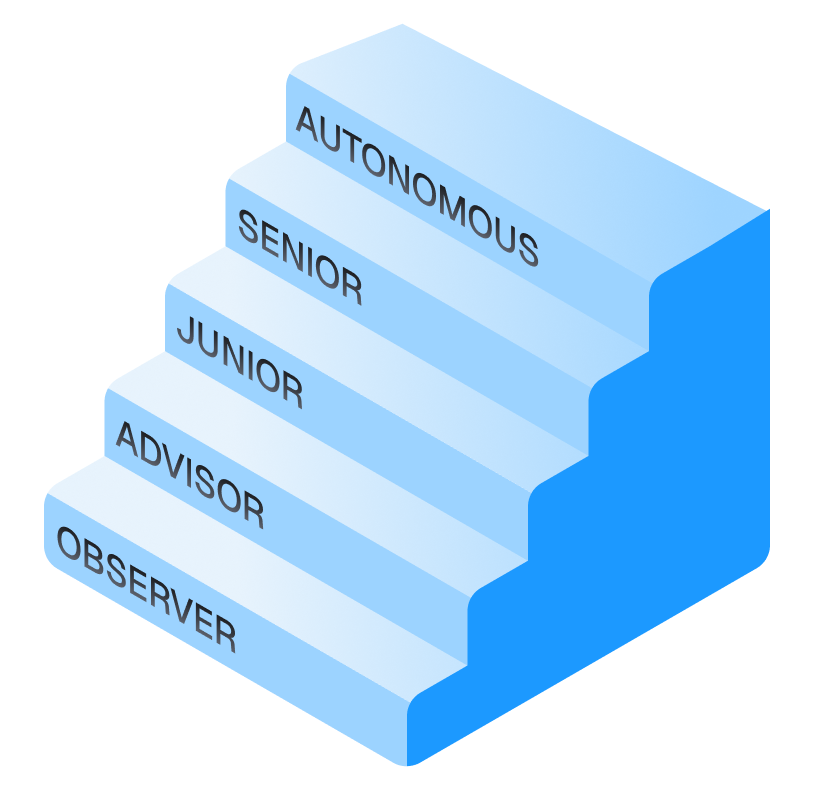
You do not need all five for every agent. You need the right level for each task.
Level 0: Observer
The agent can read your design system but cannot change it.
What it can do
- Read tokens, components, docs, code, Figma files
- Run audits (token coverage, naming violations, accessibility checks)
- Generate reports (markdown, JSON, CSV)
- Answer questions in chat (“which components use
color.primary?”)
What it cannot do
- Suggest specific changes
- Open PRs
- Modify any file in any repo
Why this level exists
Observer is the only level you should give a new agent on Day 1. You learn what it sees, what it misses, what it gets wrong. Months later, you can promote it to Advisor with confidence because you have already watched its judgment.
Observer in practice
Your design system has 87 components. You install a new audit agent. For two weeks it does nothing but generate weekly reports: “84 components have docs, 3 do not. 412 token uses, 17 hardcoded hex values found in PaymentForm.” You do nothing with the agent’s output except read it. You learn its blind spots. After 2 weeks, you know exactly what it reliably catches and what it misses.
Promotion criteria → Advisor
Promote when:
- The agent has run for at least 2 weeks against your real system
- Its reports have been accurate at least 90% of the time
- You can name 2–3 specific blind spots and have decided how to handle them
Level 1: Advisor
The agent suggests changes but never makes them.
What it can do
- Recommend specific fixes (“rename
bg-1tocolor.background.surfacein 14 places”) - Propose token additions, deprecations, renames
- Suggest component refactors
- Draft PR descriptions, but not open the PR
What it cannot do
- Open PRs
- Edit any file
- Take any action that touches the repo
Why this level exists
Advisor is the safest place for an agent that needs judgment. You read its suggestion, decide, and apply it yourself. The agent’s leverage is direction, not execution.
Advisor in practice
Your audit agent has been promoted from Observer. Now its weekly report includes a “Suggested fixes” section: “I would rename 7 token uses, deprecate 2 unused components, and split Card into Card and CardSurface.” You read it. You agree with 5 of the 9 suggestions. You apply those 5 yourself. The agent never touches a file.
Promotion criteria → Junior
Promote when:
- 80%+ of suggestions over the last 4 weeks were the right call
- Wrong suggestions were always small, easy to spot, and easy to reject
- You have a CI check or review process that would catch a bad PR before merge
- The agent has a scoped path it is allowed to touch (e.g., only
tokens/or onlydocs/)
Level 2: Junior
The agent opens small, scoped PRs. Every PR is reviewed before merge.
What it can do
- Open PRs in a single, scoped path
- Make changes that match an approved pattern (renaming, doc generation, formatting)
- Run inside automated CI checks
- Tag a human reviewer
What it cannot do
- Merge anything
- Touch protected paths (governance files, brand files, production code)
- Open PRs that change more than the approved pattern
Why this level exists
Junior is where most useful work happens. The agent does the typing. You do the reviewing. Your leverage compounds because review is much faster than execution.
Junior in practice
Your token-naming agent now opens PRs in tokens/ whenever it finds a violation. Each PR is small (1–14 token renames), labeled agent:junior, and tagged for review. You review 3 PRs per week. You merge 2 of them. The third gets a “no, that token is intentionally legacy” comment, which the agent reads and adds to its CLAUDE.md so it does not suggest the same change again.
Promotion criteria → Senior
Promote when:
- 95%+ of Junior PRs over the last 8 weeks were approved without changes
- The few rejected PRs were rejected for known, documented reasons (now in CLAUDE.md)
- A verification step exists that runs on every PR (tests, schema checks, accessibility)
- The agent’s scope has a clear “low-risk” subset where the cost of a bad merge is low
Level 3: Senior
The agent can merge low-risk PRs in approved categories. Ships behind feature flags or in low-blast-radius domains.
What it can do
- Merge PRs in approved low-risk categories (token renames, doc updates, formatting fixes)
- Ship behind feature flags
- Run scheduled jobs that touch the repo
- Open PRs in higher-risk paths but never merge them
What it cannot do
- Touch governance files, brand identity, or production-critical paths without human review
- Override the verification step
- Merge anything that fails CI
Why this level exists
Senior is where automation starts to feel real. The agent runs while you sleep. It catches drift, fixes naming, refreshes docs. Your morning starts with a list of merged PRs to skim, not a queue to review.
Senior in practice
Your docs-generation agent now runs on every commit to src/components/. When a component prop changes, the agent updates the docs file in the same commit, opens a PR, runs CI, and merges if green. You see “Auto-merged: Updated 3 component docs” in your morning Slack. You skim. You move on. The system is updating itself.
Promotion criteria → Autonomous
Promote when:
- The agent has been Senior for at least a quarter
- Verification has caught real bugs at least once and the agent listened
- A kill switch exists and works (one command pauses the agent’s loop)
- The category of work is well-bounded (not “anything in the repo,” but “this exact pattern”)
- The cost of a missed bad merge is recoverable in under an hour
Autonomous does not mean unsupervised. It means the supervision is structural (verifier + kill switch) instead of manual (review every PR). You traded human review for system review.
Level 4: Autonomous
The agent runs end-to-end loops in approved domains. The verifier is the supervisor.
What it can do
- Run scheduled or event-driven loops without per-action approval
- Plan, execute, verify, and ship within a bounded domain
- Self-correct when the verifier flags issues
- Use other agents as sub-tasks
What it cannot do
- Override the verifier (the verifier is the only thing that can pass or block work)
- Bypass the kill switch
- Cross domain boundaries (an autonomous token agent cannot suddenly start editing components)
Why this level exists
Autonomous is the destination for one or two agents on a mature system, not a default. You promote here only when the work is high-frequency, well-bounded, and the verifier is trusted as much as the agent.
Autonomous in practice
Your token-parity agent runs every 6 hours. It compares Figma variables to code tokens. If it finds drift, it opens a PR with the fix, runs the parity check as CI, and merges if the check passes. If anything outside the parity check fails, it pauses the loop and tags you. You have not reviewed a parity PR in 3 months. The system is self-healing.
Demotion criteria
An Autonomous agent gets demoted to Senior the first time:
- It ships drift the verifier missed
- The verifier itself produces a false positive that wastes more than an hour
- A human catches a pattern of bad merges over the last 30 days
Demotion is a reset, not a failure. You fix the verifier, you tighten the domain, and you re-promote when the criteria are met again.
How to apply this to your team
You do not need a global policy. You need a per-agent decision.
Step 1: List your agents
Write down every agent you currently use: review skills, audit skills, doc generators, parallel reviewers, parity checkers. Aim for a list of 5–15.
Step 2: Assign each one a current level
Be honest. If your “audit agent” actually opens PRs and you sometimes merge them without reading carefully, it is operating at Senior, not Junior. Match the label to the actual behavior.
Step 3: Identify mismatches
Two failure modes:
- Over-trusted: the agent acts at a level its track record does not support. Demote it.
- Under-trusted: the agent has earned a higher level but you are still reviewing every action. Promote it. Stop wasting your time.
Step 4: Write promotion criteria into your CLAUDE.md
For each agent, write one paragraph:
Audit agent. Currently Junior. Will be promoted to Senior when 95%+ of its PRs in tokens/ are merged unchanged for 8 consecutive weeks. Will be demoted if a Junior PR introduces a token rename that breaks production.This is governance. It is also documentation. New teammates can read it and understand why the agent is allowed to do what it does.
The path-scoped trust model
Trust is not just about levels. It is also about scope. The same agent can be Senior in tokens/ and Observer in app/billing/.
Use the same .claude/rules/ pattern from Part 1:
.claude/rules/
├── tokens/
│   └── trust-level.md     # Senior. Auto-merge approved patterns.
├── components/
│   └── trust-level.md     # Junior. Open PRs, never merge.
├── docs/
│   └── trust-level.md     # Senior. Auto-merge.
└── billing/
    └── trust-level.md     # Observer. Read-only. Always.
Each trust-level.md file says exactly what the agent is allowed to do in that path, what triggers escalation, and what the kill switch is.
The agent loads the right rules contextually. Same agent, different authority, depending on what it touches.
The kill switch is not optional
Every level above Observer needs a kill switch. The kill switch is one command (or one toggle) that pauses every agent’s loop immediately.
Common patterns:
- A repo-level environment variable (
AGENTS_PAUSED=true) - A status check that fails by default and only passes if the kill switch is off
- A scheduled job that checks a single source of truth (a file in the repo, a row in a database) before running
Without a kill switch, you cannot demote an agent fast enough when it goes wrong. The kill switch is the difference between “we noticed an issue, paused everything in 30 seconds, fixed it, and resumed” and “the agent shipped drift for 6 hours before anyone noticed.”
Kill switches are a governance primitive. The faster you can stop the loop, the more autonomy you can safely grant. Speed of stopping is what makes autonomy responsible.
If something stops working, check the Trust levels section of Common failure modes.
Checklist: you have a working trust system when
What you learned
What this unlocks
Once trust levels are real, three things change:
- You stop reviewing the same kind of PR over and over. The agents you promoted run while you sleep. The ones you held back stay safe.
- Promotion becomes a measurable career path for your agents. New agents start at Observer. Good ones get promoted. Bad ones stay at Advisor or get retired.
- You can scale governance without scaling your team. Adding a new agent is a known process: install at Observer, watch for two weeks, decide. Not a free-for-all.
This is the foundation for the next part of the series, where we go deeper into the longest level (Observer) and use it as the cheapest way to discover whether an agent should ever be promoted at all.
Where the rest of the series goes
| Part | Title | Status |
|---|---|---|
| 1 | What Is an Agentic Design System? | Published |
| 2 | Trust Levels: How Agents Earn Autonomy (this piece) | Published |
| 3 | Observer Mode: Learning Before Acting | Coming next |
| 4 | The Self-Healing Flywheel | Coming next |
| 5 | Building the Agentic Operating Model | Coming next |
Assign a trust level to every agent you already use
-
List every agent and the level it actually operates at
Open a doc. Write every agent you use right now (skills, audit tools, review bots, doc generators, MCP servers that write). For each one, write a single sentence describing what it does, and pick Observer, Advisor, Junior, Senior, or Autonomous based on the real behavior, not the intended behavior.
- Every agent has one of the five labels, no “kind of” or “halfway”
- At least one agent is mislabeled compared to how your team describes it in meetings
- You can name the protected paths each agent is barred from touching
-
Write the promotion or demotion rule into CLAUDE.md
Pick one agent that is either over-trusted or under-trusted. Open the project’s CLAUDE.md (or create a
.claude/rules/trust-level.mdfor that path). Write one paragraph that states the current level, the promotion criteria, and the kill switch. Commit it.- Names the agent, the level, and the scope (path or domain) in the first sentence
- Promotion criteria are measurable, not vibes (e.g., “95% of PRs merged unchanged over 8 weeks”)
- A kill switch is named by exact command or file path, not hand-waved
- A teammate could read the paragraph and apply the rule without asking you a question
Finished the last lesson?
Mark it complete to wrap up "Codex for Designers" on your dashboard.
The guides alone saved me a full day of work every sprint.
- All guides, prompts, and templates
- Starter kits and templates
- New content every week
- Priority support